
A collection of phones becomes a useful production station only when the team can identify each device, understand its task, and recover from a fault. Buying more hardware does not automatically increase reliable channel capacity. The limiting factor may be review time, account permissions, network availability, or the number of people able to respond to exceptions.
Plan around authorized tasks rather than a headline such as “fifty channels on ten phones.” Channel count alone says little about workload. A team checking occasional playback has different needs from a team preparing many approved assets and coordinating several editors.
Describe the work before the equipment
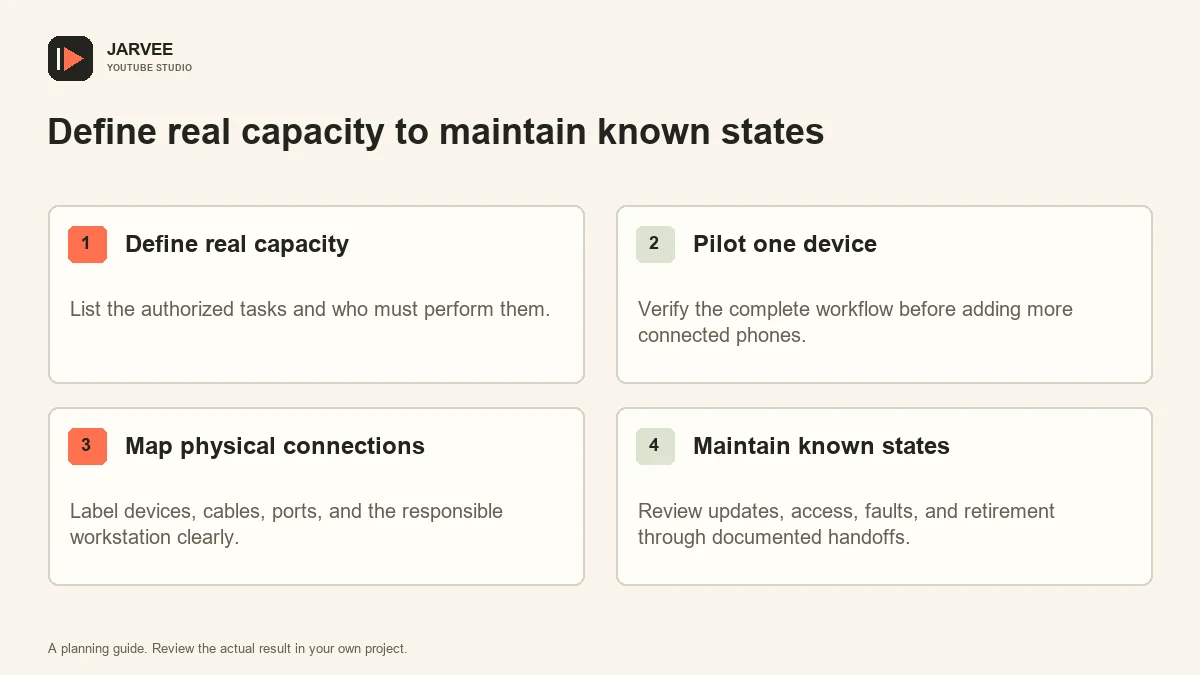
List the tasks the station must support: mobile playback review, format inspection, approved application testing, or other legitimate operations. For each task, identify the operator, required account role, expected duration, and completion evidence. This makes it possible to estimate workload without pretending that every phone adds a fixed number of channels.
Separate human review from device availability. A phone can be idle while a caption correction waits for a reviewer. Adding hardware will not resolve that queue. Identify the slowest stage before purchasing equipment and decide whether the next improvement belongs in staffing, preparation, or the physical setup.
Our guide to separate video and Shorts workflows can help define distinct checks. A device station should support a documented process, with different asset and review requirements kept visible.
Run a one-device pilot
Use one representative phone and one approved workstation to complete the whole task. Include sign-in, permissions, application updates, network access, review, and handoff. Record failures and manual steps. A pilot that stops after the phone charges or appears in a connection list has not tested the operational workflow.
Choose hardware according to supported software, screen readability, storage needs, repair options, and the manufacturer’s intended use. Avoid assuming that the cheapest available phone is adequate merely because an app launches. An unsupported device can create update and security work that exceeds the original saving.
Use manufacturer-approved power arrangements and follow the instructions for the exact devices and accessories. Do not improvise electrical modifications or assume a generic hub label establishes suitability for every phone. Where power capacity or installation is uncertain, involve a qualified person who can assess the actual setup.
Make the physical map unambiguous
Assign each phone a durable inventory label and record its model, operating-system version, responsible owner, and intended task. Label the corresponding cable and connection point. The purpose is to let an operator identify the correct device without opening personal account pages or guessing from a screen wallpaper.
Android’s ADB documentation explains identifying and targeting connected devices. When debugging is needed, map the device identifier to the physical label and explicitly select the intended device. A command should never rely on an operator assuming which phone is first in a list.
Keep the map current when replacing a cable, moving a port, or retiring a phone. A neat initial diagram becomes misleading if changes are not recorded. The person making a physical change should update the inventory before returning the station to normal use.
Design the account handoff
Document who may use each channel and how they obtain authorized access. Prefer appropriate channel roles over a shared master password. A device’s location on the shelf is not an access-control system, and a locked screen does not explain which operator performed a publication action.
Keep account recovery material in the approved secure process, separate from the public inventory. The station sheet can identify the responsible account owner without containing passwords, backup codes, or session exports. A replacement operator needs a legitimate access route, not a folder of copied credentials.
Before a public change, verify the visible channel identity and asset. Similar icons and repeated titles can cause cross-channel mistakes. Build this check into the task handoff rather than relying on the operator’s memory of which phone normally serves which channel.
Plan for faults and maintenance
Create a simple state model: available, in use, awaiting review, maintenance required, or retired. Include the reason when a device is unavailable. A phone with an intermittent connection should not silently return to the pool because it happened to work once.
Set maintenance triggers for operating-system updates, application changes, damaged accessories, storage pressure, and abnormal physical condition. Use the relevant manufacturer’s instructions for care and fault handling. Do not create universal battery percentages or temperature thresholds that ignore model-specific guidance.
The site’s activity review workflow provides a useful basis for documenting intended tasks and results. For a device station, also record which physical unit and operator were involved so a recurring fault can be traced.
Scale only after the process is stable
Add a small number of devices, then repeat the complete workflow under realistic load. Observe connection reliability, review queues, operator mistakes, and recovery time. A station that works when one expert watches it may fail when several people use it across a shift.
Use measured task demand to decide whether more hardware is necessary. If the review queue is growing while devices remain available, improve the review stage. If one connection path repeatedly fails, repair that path. Capacity planning should identify the constraint rather than celebrate the number of phones installed.
Keep a retirement procedure. Remove authorized sessions, revoke unnecessary workstation access, preserve approved business assets, and handle disposal through the appropriate manufacturer or local route. A retired phone should not remain an unexplained source of channel access.
The result should be a station another trained person can understand: labeled equipment, known permissions, a visible task queue, and clear fault handling. Those qualities support reliable work. Physical devices do not provide a guarantee against platform enforcement, and the station should never be designed around such a promise.
Test the handoff between operators
Ask a trained colleague who did not build the station to complete one ordinary task using only the inventory and instructions. Watch where they hesitate. Perhaps a cable label is hidden, a device state is ambiguous, or the account owner is missing from the record. Correct those concrete gaps before adding more equipment.
Include an exception in the handoff exercise, such as a device already marked for maintenance. The colleague should know where to report it and which approved alternative to use. The goal is a process that remains understandable during a fault, not only when every screen looks exactly as the original installer expected.
KEEP EXPLORING
Put the workflow in context.
See the five YouTube tools available in SMTasker and choose the actions that fit your account.
Explore the tools