
A script that taps a screen at fixed coordinates is not a reliable production workflow by itself. The screen can change, a dialog can appear, and the active channel can differ from the one expected. Reliable Android testing begins with observable states and a clear definition of what the test is allowed to do.
Use automation to support authorized inspection and repeatable quality checks. Do not frame touch simulation as a way to defeat fraud detection or create “human” engagement. A gesture’s technical origin does not establish that the resulting activity is appropriate or that an account will avoid enforcement.
Choose a test with a clear boundary
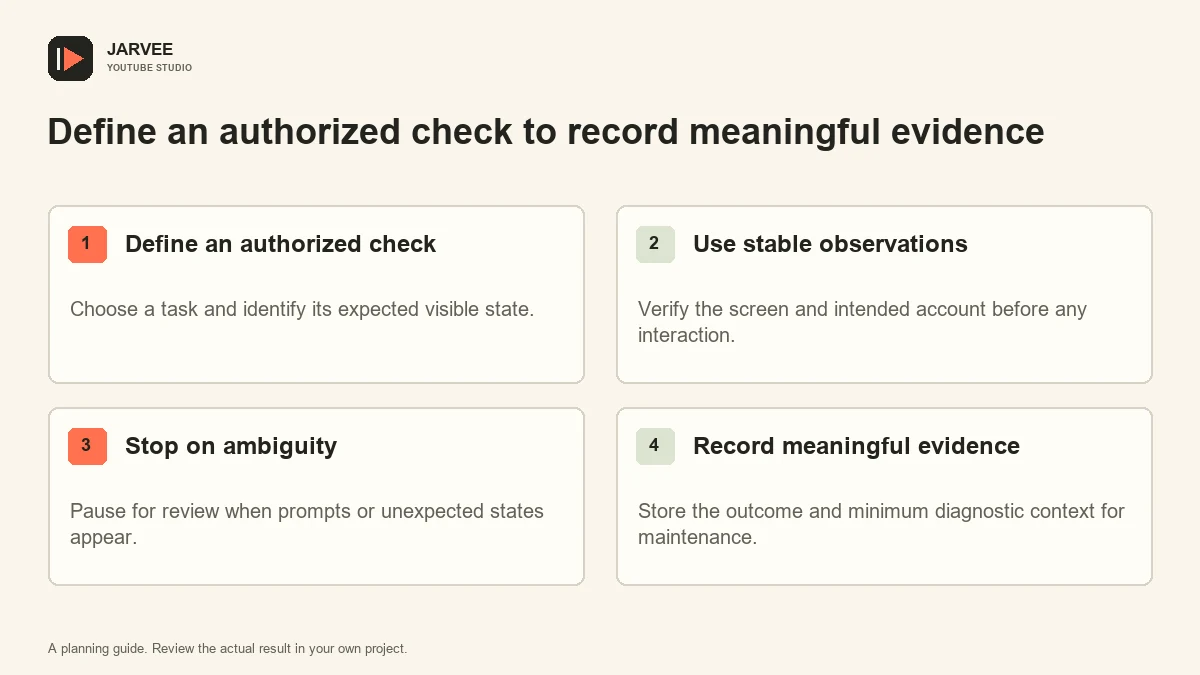
A suitable test might verify that an approved mobile layout remains readable or that an internal test application presents the expected screen. Define the device, application context, starting state, and expected result. If the check involves a signed-in service, confirm the account’s authorization and the platform rules relevant to the activity.
Separate observation from actions that change public content. Reading a screen is different from posting a comment, publishing a video, or altering channel settings. Those actions need their own approval and verification. A test should not inherit broad permission merely because its operator can control the phone.
Write the stop conditions before the interaction steps. Unexpected sign-in prompts, security challenges, unfamiliar dialogs, wrong account identity, and unavailable content are reasons to pause for a person. They are not invitations to keep tapping until something happens.
Prefer state checks over blind timing
Android’s UI Automator documentation describes a framework for UI testing with element finding, state handling, and waiting mechanisms. The important design lesson is to observe the relevant condition instead of assuming a screen is ready after a fixed pause.
A delay can be necessary, but it should not be the only evidence that the expected state exists. A slow network, update message, or accessibility setting can change timing and layout. Check the specific element or condition that makes the next action appropriate.
Coordinates can still be useful in controlled testing, but record their assumptions: device dimensions, orientation, application version, and layout. If those assumptions change, the test needs review. Do not let a coordinate intended for a harmless button become an unexamined tap on a different screen.
Make identity an explicit precondition
Before any authorized action that changes a service, confirm the intended account or channel through an appropriate visible or supported check. Similar profile images are not enough. Keep the test’s identity expectation in the task record and stop if the observed state does not match.
Do not solve sign-in problems by copying session files or bypassing verification. A test that depends on unauthorized access is not a valid quality check. Use the legitimate account process, and separate the person resolving access from the test’s routine execution where that makes the responsibility clearer.
The site’s activity review workflow is useful for structuring the result: intended task, observed action, outcome, and exception. A test log should support that comparison rather than merely count taps.
Design for ambiguity and recovery
Unexpected screens should produce a clear status such as needs review, with enough context for a person to understand the issue. Avoid automatic retries after a potentially consequential action unless the workflow can confirm whether the first attempt succeeded. Otherwise a retry can duplicate a publication or repeat an unwanted change.
Define what can be retried safely. Re-reading a screen may be harmless; resubmitting a public action may not be. Keep those cases separate in the design. A generic retry loop is easy to implement and difficult to trust when the state of the external service is uncertain.
Have a documented return-to-service step. After a person resolves a dialog or updates the application, rerun the relevant preconditions. Do not resume halfway through a sequence based on assumptions that were valid before the interruption but may no longer hold.
Collect evidence without collecting everything
Store the device identifier used by the inventory, software versions relevant to the test, timestamp, expected state, observed state, and outcome. A screenshot may be helpful, but review it for personal information and keep it in an approved location. Full screen recordings are not automatically necessary for every routine check.
Keep passwords, verification codes, and session tokens out of logs. If a tool captures them incidentally, fix the capture process and handle the exposed material through the appropriate security procedure. Diagnostic convenience does not justify turning secrets into shared artifacts.
Use the site’s guide to separate video and Shorts workflows when deciding what visual checks belong to each format. A test that confirms one layout cannot certify that a differently cropped asset is readable.
Maintain tests like production assets
Assign an owner for each check and a review trigger for relevant application or operating-system changes. Keep the test’s purpose visible so a future maintainer can decide whether it still matters. A fragile script should not survive indefinitely merely because nobody remembers why it was written.
Review failures for patterns. If a check repeatedly stops at a harmless optional dialog, decide whether the test should handle that documented state or whether the setup should change. If it fails unpredictably, investigate the underlying assumptions before widening the retry logic.
Measure the quality of the check by whether it detects a meaningful issue and produces a trustworthy result. A long uninterrupted run is not proof that the script inspected the correct thing. Periodically verify the evidence against a human review.
The goal is a bounded, understandable test that supports legitimate work. Clear preconditions, observable outcomes, and useful stop conditions make automation easier to maintain. Claims about invisible behavior or guaranteed trust add no reliability to that process.
Review a failure before changing the script
Suppose a check expected a playback screen but found an application update notice. Preserve that observation and stop the sequence. A maintainer can decide whether the update is approved, whether the notice is an expected state, and whether the test needs revision. Adding more taps immediately would hide the original cause and might activate an unintended control.
After the approved change, rerun the check from its defined starting state. Confirm that it still identifies the correct screen and produces the intended evidence. This small maintenance cycle is more dependable than accumulating exceptions in a script whose original assumptions nobody can explain.
KEEP EXPLORING
Put the workflow in context.
See the five YouTube tools available in SMTasker and choose the actions that fit your account.
Explore the tools